PayPal
PayPal Integration
This section explains how to configure and enable PayPal payment integration in the JustBilling Integration module to collect payments via PayPal.
Overview
The PayPal Integration allows merchants to accept online payments securely using PayPal. Once enabled and configured, customers can select PayPal as a payment option during checkout.
Accessing PayPal Integration
- Navigate to JustBilling → Integration.
- Select PayPal from the list of available payment integrations.
- The PayPal configuration screen is displayed.
Screen Elements:
- PayPal integration banner
- Configuration tab
- Enable/Disable toggle
- PayPal credential fields
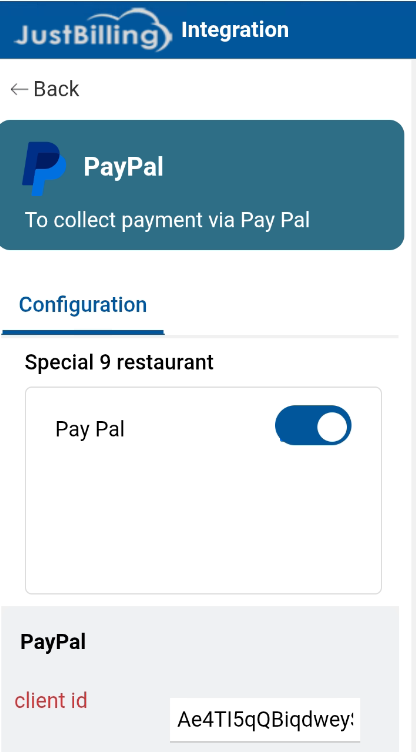
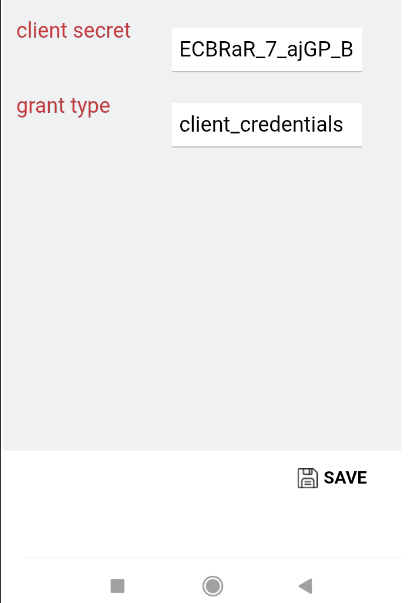
( Figure-1-Paypal Configuration)
Enabling PayPal for a Restaurant
Steps to enable PayPal:
- Under the Configuration section,
- Locate the PayPal toggle switch.
- Turn the toggle ON to enable PayPal for the selected restaurant.
Note: When PayPal is disabled, payment configuration fields are hidden and PayPal will not be available during checkout.
PayPal Configuration Details
Once PayPal is enabled, the configuration section becomes available.
Required Fields
|
Field Name |
Description |
|
Client ID |
Unique identifier provided by PayPal for API authentication |
|
Client Secret |
Secure key used to authenticate PayPal API requests |
|
Grant Type |
Authentication type used for PayPal access (default: client_credentials) |
Configuring PayPal Credentials
Steps to configure PayPal:
- Enter the Client ID provided by PayPal.
- Enter the corresponding Client Secret.
- Verify that the Grant Type is set to client_credentials.
- Save the configuration (if Save option is available).
Important:
- Ensure credentials are copied correctly from the PayPal Developer Dashboard.
- Keep the Client Secret confidential to avoid security issues.
Disabling PayPal Integration
To disable PayPal for a restaurant:
- Navigate to the PayPal Integration screen.
- Turn the PayPal toggle switch OFF.
- PayPal will no longer appear as a payment option for customers
Behavior After Successful Configuration
Once PayPal is enabled and configured:
- PayPal appears as a payment option during checkout
- Customers can complete payments via PayPal securely
- Payment transactions are processed through PayPal APIs
- Transaction status is reflected in payment reports
Important Notes
- PayPal credentials must be valid and active.
- Incorrect credentials may result in payment failures.
- Internet connectivity is required for PayPal payment processing.
- Any change in PayPal credentials should be tested before going live.