Instamojo
Instamojo Integration
The Instamojo Integration allows JustBilling users to collect online payments seamlessly through the Instamojo payment gateway.
This section explains how to enable, configure, and manage Instamojo credentials inside the JustBilling application.
Accessing Instamojo Integration
- Navigate to Menu → Integrations.
Click Manage under the Instamojo tile.
You will be redirected to the Instamojo configuration page.
Instamojo Configuration Overview
The configuration page consists of two main sections:
Integration Toggle (Enable/Disable Instamojo)
- A toggle switch is available to enable or disable the Instamojo payment mode for the selected branch (e.g., Cosco).
When the toggle is ON, the Instamojo configuration fields become active.
When the toggle is OFF, the integration remains disabled and no Instamojo transactions will be processed.
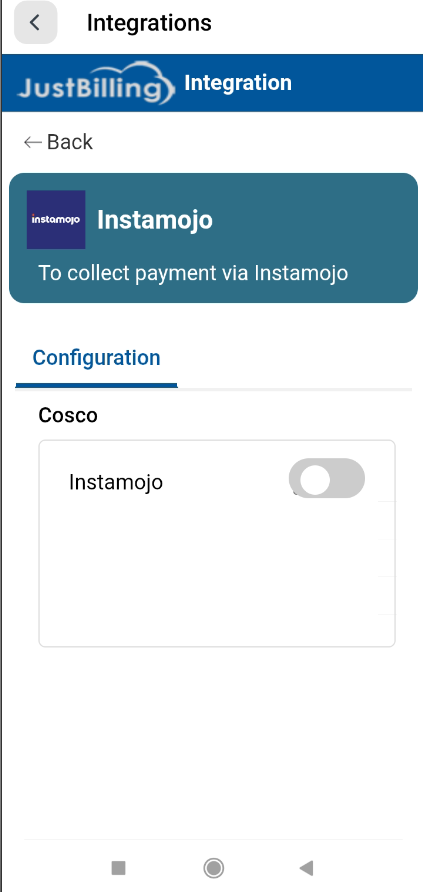
(Figure-1- Instamojo Configuration)
Instamojo Credentials Setup
Once the Instamojo toggle is enabled, the following fields appear:
Client ID
- This is the unique API Client ID issued by Instamojo.
- Used for authenticating your JustBilling application with Instamojo servers.
- Must be copied exactly from your Instamojo dashboard.
Client Secret
- A secure API key used to validate API requests.
Must be kept confidential and not shared with unauthorized users.
Required for generating access tokens during payment processing.
Grant Type
- Pre-filled with client_credentials.
- This defines the authorization method used by the payment gateway.
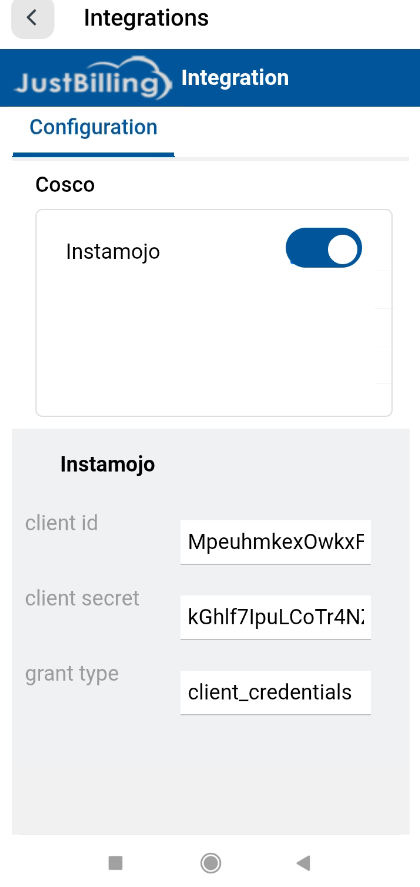
(Figure-2- Instamojo Configuration)
How Payments Work After Configuration
Once configured:
- Instamojo becomes available as a payment option during checkout.
- Customers can complete payments using the Instamojo interface.
- The payment status is automatically updated in JustBilling.