Profit & Loss Report
Profit & Loss Report
Overview
The Profit & Loss Report provides a consolidated financial summary of your business performance over a selected financial year or date range. It helps you understand revenue, expenses, cost of goods sold (COGS), and profitability in a clear and structured format.
This report is typically used by business owners, accountants, and managers to analyze financial health and support decision-making.

(Figure 1 - Detailed serial expiry Report)
(Figure 2 - Detailed serial expiry Report)

(Figure 3 - Detailed serial expiry Report)
Navigation
Menu Path:
Dashboard → Reports → Profit & Loss Report
Profit & Loss Report
1. Header Section
The top section displays key business and reporting details:
- Business Name – The registered outlet or organization name
- Business Address – Full address with city, state, and postal code
- Contact Details – Phone number and email ID
- GSTIN – Registered GST identification number
- Financial Year – Selected financial year (e.g., 2025–2026)
- Report Period – Start and end date (e.g., 01-Apr-2025 to 31-Mar-2026)
This information ensures the report is compliant and clearly identifiable.
2. Date / Financial Year Selection
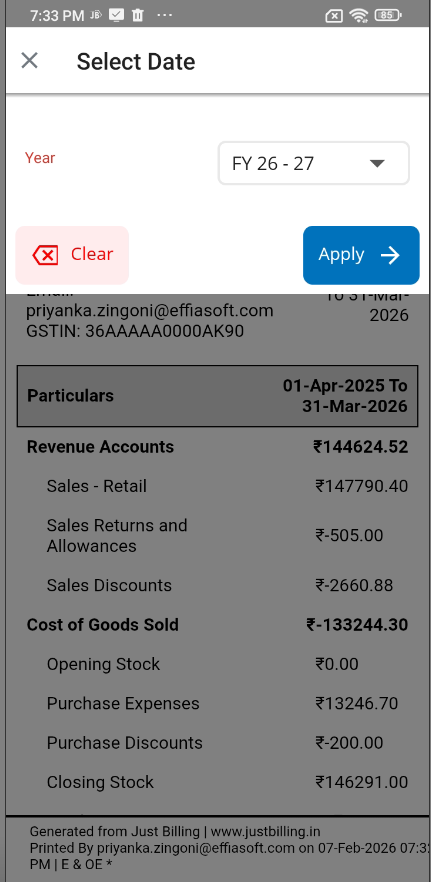
Select Date Popup
To change the reporting period:
- Tap on the Filter / Date icon at the top.
- The Select Date popup opens.
- Choose the required Financial Year (e.g., FY 25–26).
- Click Apply to refresh the report.
- Click Clear to remove the selected filter and reset.
✅ The report automatically recalculates values based on the selected year.
Report Sections
3. Revenue Accounts
This section shows income earned during the selected period.
Includes:
- Sales – Retail
Total revenue from completed sales. - Sales Returns and Allowances
Amount refunded or credited due to returns. - Sales Discounts
Total discounts applied on sales.
Net Revenue is calculated after subtracting returns and discounts.
4. Cost of Goods Sold (COGS)
Displays the direct cost involved in selling products.
Includes:
- Opening Stock – Inventory value at the beginning of the period
- Purchase Expenses – Cost of goods purchased
- Purchase Discounts – Discounts received from suppliers
- Closing Stock – Inventory value at the end of the period
This section helps calculate gross profit accurately.
5. Profit Calculation
The system automatically computes:
- Gross Profit / Loss
- Based on:
Revenue – Cost of Goods Sold
All amounts are shown in ₹ (INR) for clarity.
Footer Information
At the bottom of the report, the following details are displayed:
- Generated from: Just Billing
- Printed by: Logged-in user email
- Date & Time: When the report was generated
- Report Type: P&L (Profit & Loss)
This ensures audit traceability
Actions & Options
6. More Options Menu (⋮)
Available from the top-right corner.
a. Print
- Generates a printer-friendly version of the report.
- Useful for audits, accounting, or offline review.
b. Share
- Share the report as a PDF or document via:
- Messaging apps
- Cloud storage
Use Cases
- Monthly / yearly financial review
- GST and statutory reporting
- Business performance analysis
- Sharing reports with accountants or auditors
Key Notes
- All figures are system-calculated and non-editable.
- Ensure transactions are finalized before generating reports.
- Report values change dynamically based on the selected financial year.