JB Assist
JB Assist – AI Chatbot
The JB Assist AI Chatbot is an in-built virtual assistant in JustBilling designed to help users navigate the application, answer queries, and provide step-by-step instructions in real time.
This guide explains how to access, use, and benefit from JB Assist.
What is JB Assist?
JB Assist is an intelligent help assistant integrated within JustBilling application
It provides:
- Instant answers to how-to questions
- Step-by-step instructions for tasks
- Quick navigation guidance
- Product creation, billing, and configuration help.
- Troubleshooting support
- Information on features and modules inside JustBilling
It works exactly like a live help agent inside the software.
Accessing JB Assist
JB Assist automatically appears on the right side of the Dashboard, or you can open it manually:
Steps:
- Log in to JustBilling .
- On the Dashboard, locate the JB Assist panel on the right side.
- Click the chatbot icon (JB Assist) if it is minimized.
JB Assist will slide out and become visible as shown in the screenshot.
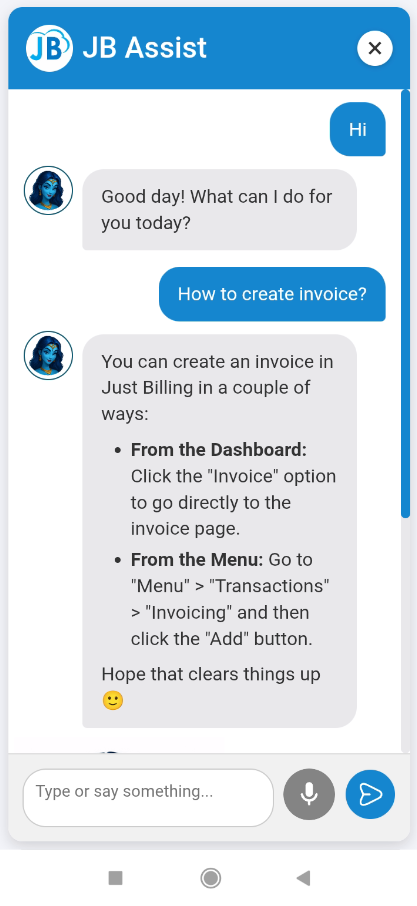
(Figure-1-JB Assist)
Asking Questions
You can type any question in the text box at the bottom of JB Assist.
Examples:
- “How to create products?”
- “How to generate invoices?”
- “How to add customers?”
- “How to enable integrations?”
- “How to check stock?”
JB Assist responds instantly with detailed guidance.
Key Features of JB Assist
24×7 Virtual Support
Instant help without waiting for support staff.
Step-by-Step Help Instructions
Clear, structured guidance for all modules.
Smart Search
Understands natural questions and provides accurate responses.
Task-based Assistance
Examples:
- Add sale
- Create products
- Generate purchase order
- Manage inventory
- Enable subscriptions
- Configure integrations
Integrated with Dashboard
Always accessible while working.
No Extra Cost
Included free inside JustBilling.
How to Use JB Assist Effectively
|
Action |
Result |
|
Ask “How to…?” |
Provides detailed steps |
|
Ask feature-specific questions |
Returns module explanations |
|
Ask setup/configuration queries |
Shows exact menu path |
|
Ask troubleshooting questions |
Gives resolution steps |
|
Scroll the chat |
View previous instructions |
JB Assist remembers your recent questions during the session.
Closing or Minimizing JB Assist
To close the assistant:
- Click the “X” button at the top-right of the chatbot window.
To reopen it:
- Click the JB Assist button on the right side of the Dashboard.
When to Use JB Assist
JB Assist is helpful when you want quick guidance regarding:
- How to create or edit products
- How to add stock / inventory
- How to bill customers
- How to manage purchases
- How to generate reports
- How to use integrations (SMS, PhonePe, Shopify, Razorpay, etc.)
- Any setup or configuration help